Virtualized TPM for guests
TPM device access for guests
Section titled “TPM device access for guests”A TPM device is provided to virtual machines as a building block for securely storing secrets and performing cryptographic operations. A device compatible with the TPM 2.0 specification also benefits from existing integration with open-source components such as bootloaders, Linux kernel, userspace tools, etc. The challenge resides in exposing a functional TPM interface to guests while minimizing the reliance on the host and preventing host-based attacks.
Broadly, two methods are available to expose a TPM to a virtual machine: passthrough of a hardware device or emulation in software. Both methods have their own complexities, benefits and drawbacks. The hardware passthrough is the simplest to implement as it can usually be done with a few additions to the VMM configuration. However if used as the default for all VMs, it can introduce issues due to concurrent access to the hardware device and can even lead to denial-of-service scenarios. The emulation method benefits from better isolation between guests and more control over the communication channel, at the expense of increased complexity. After some initial analysis, a variant of the emulation method was chosen as the default way to provide TPM capabilities, but with the added constraint that the state of the emulated TPM must be stored in a dedicated VM and never exposed to the host.
This design prevents straightforward attacks that aim to retrieve the guest TPM state from the host filesystem. Access to the swtpm state file on the host OS is only controlled by file permissions (and MAC frameworks to an extent) which lack granularity, are subject to misconfigurations, and can be circumvented by privileged processes.
However, running the daemon in a virtual machine does not protect against more complex attack vectors that directly target guest memory and/or device drivers. The introduction of protected virtualization (pKVM) is necessary to completely close the attack surface from the host OS.
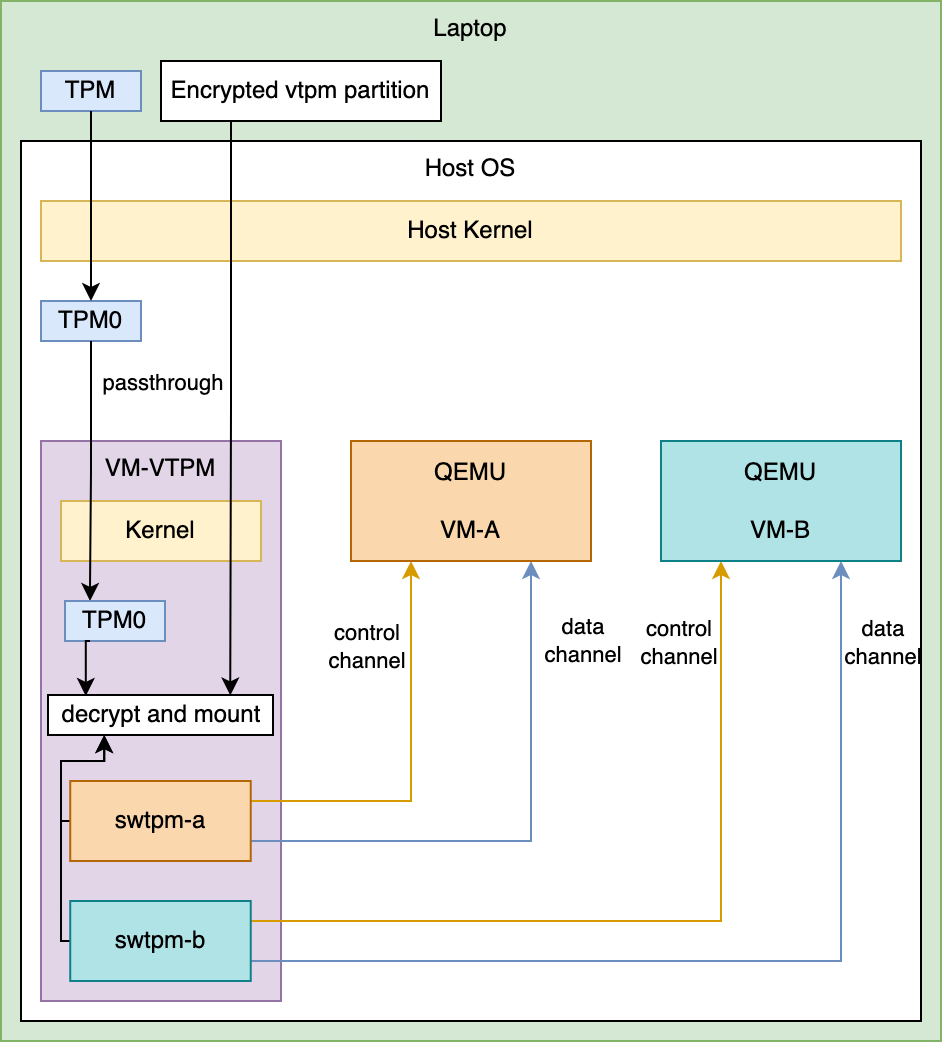
From an architectural standpoint, TPM access to guests is implemented in the following way:
- a VM is dedicated to hosting instances of swtpm
- swtpm state is stored on a secure guest filesystem backed by a hardware TPM
- swtpm control and data channels are exposed to other VMs through an IPC channel
- QEMU sends and receives TPM commands to the swtpm daemon over IPC
The high-level design is shown in the following diagram:
Implementation
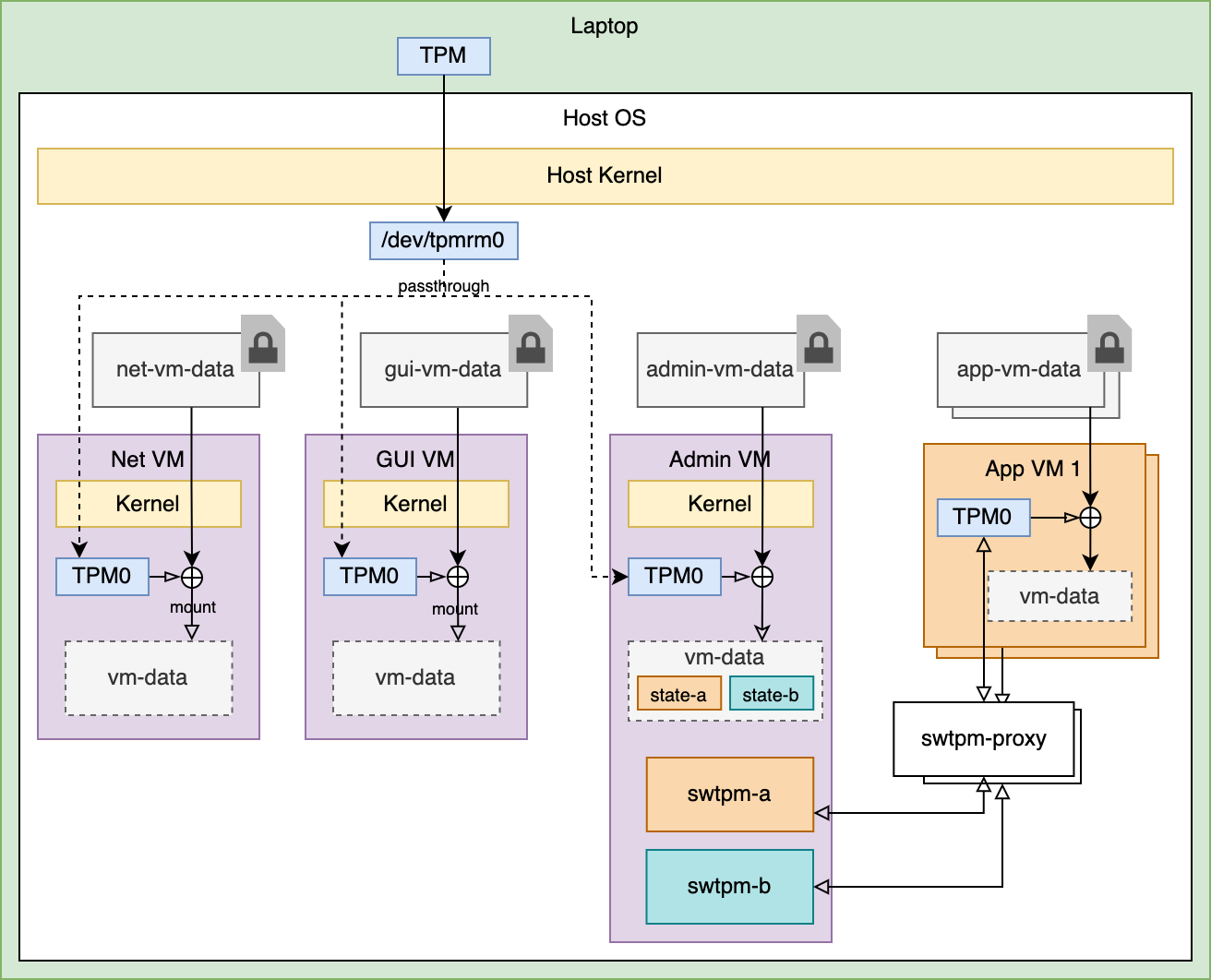
Section titled “Implementation”The implementation of the emulated TPM in Ghaf deviates from the aforementioned design in a few areas:
- The admin VM takes the role of hosting the swtpm instances. This reduces the footprint of running an additional VM.
- A new component is introduced: swtpm-proxy-shim. It is a daemon that runs on the host and allows QEMU to use a remote swtpm as a backend, which QEMU does not support by default.
- A subset of VMs, specifically system VMs, are set to use the hardware passthrough instead of the remote software TPM. It is important for some VMs to not be delayed during boot to have peripherals brought up as soon as possible. This is the case for example for net VM and GUI VM, to have network and graphics hardware available early. If these VMs were using the emulated TPM they would have to wait until the vTPM VM (in this case the admin VM) is fully booted before they themselves can start, which would significantly increase the time the user has to wait for peripherals to be ready.
After introducing these changes, the current implementation of the feature is illustrated on the diagram below:
App VM vTPM Auto-Configuration
Section titled “App VM vTPM Auto-Configuration”App VMs use emulated TPM exclusively, via the admin-vm proxy chain described above. Two mechanisms automate the setup so that downstream consumers and new app VMs require minimal (or zero) explicit vTPM configuration:
Automatic enablement. When storage encryption is enabled globally (ghaf.virtualization.storagevm-encryption.enable), every app VM automatically gets an emulated vTPM with runInVM = true. This satisfies the storagevm assertion (“VM must have access to a TPM to enable storage encryption”) without requiring each VM to set vtpm options. Downstream flakes that add app VMs via mkAppVm get encryption support for free.
Without encryption, VMs can still opt in to vTPM by setting vtpm.enable = lib.mkDefault true in the mkAppVm call. In that case, swtpm runs host-side (no proxy chain, no basePort needed).
Automatic port assignment. Each VM using the proxy path (vtpm.enable && vtpm.runInVM) needs a unique TCP basePort for the swtpm-proxy-shim (control port at basePort, data port at basePort+1). Ports are assigned automatically in appvm.nix: all proxy VMs are sorted alphabetically by name and assigned ports starting at 9100 in steps of 10. This eliminates manual port management and prevents collisions between upstream and downstream VMs.
Port stability across rebuilds is guaranteed by VM name ordering, not insertion order. Adding a new VM may shift other VMs’ ports, but this is safe — swtpm state is persisted by VM name (/var/lib/swtpm/${name}/state), not by port number. Ports are runtime TCP channels that are re-established on every boot.
| Encryption | Explicit vtpm.enable | Result |
|---|---|---|
| OFF | not set | No TPM, no encryption |
| OFF | true | Host-side swtpm (no proxy, no basePort) |
| ON | not set | Admin-vm proxy with auto-assigned basePort |
| ON | true | Admin-vm proxy with auto-assigned basePort |
Remarks
Section titled “Remarks”Applications that access the TPM should ideally use TPM 2.0 authenticated sessions. They enable encryption of TPM command payloads, which ensures inspecting or tampering of key material in-transit is not possible. This can be enforced in future updates.